Using spaCy to Build Constituency Parse Trees
Introduction
I have created constituency-based parse trees for three short sentences. I decided to use spaCy as the main NLP pipeline and benepar as the constituency parser that plugs into spaCy. This gave me a practical way to move from plain English sentences to phrase-structure trees that can be exported as diagrams.
What is a constituency-based parse tree?
A constituency parse tree shows how a sentence can be broken into nested grammatical units, also called constituents. Instead of focusing mainly on word-to-word dependency relations, a constituency tree groups words into phrases such as:
- S: sentence
- NP: noun phrase
- VP: verb phrase
- PP: prepositional phrase
It also shows part-of-speech categories at lower levels, such as:
- DT: determiner
- NN: singular noun
- NNS: plural noun
- VBD: past tense verb
- VBZ: third-person singular present verb
- IN: preposition
This makes constituency parsing especially useful when analyzing the internal phrase structure of a sentence. It is a good fit for learning how natural language can be represented as a hierarchy rather than just a flat sequence of tokens.
Why use spaCy?
spaCy gives a robust pipeline for handling text input, tokenisation, and sentence segmentation. For constituency parsing, spaCy is commonly paired with benepar, which adds phrase-structure parsing to the pipeline. The output can then be accessed as a bracketed parse string and converted into a visual tree diagram.
The workflow is:
- Load a spaCy English pipeline.
- Add benepar to the pipeline.
- Parse the sentence.
- Read the constituency tree as a bracketed string.
- Convert the result into a diagram.
Python approach
My implementation uses:
- spaCy for the NLP pipeline
- benepar for constituency parsing
- NLTK for turning bracketed parse strings into tree objects
- matplotlib for saving the tree diagrams as PNG images
The full script is included at the end of this post.
Sentence 1: “The government raised interest rates.”
Diagram
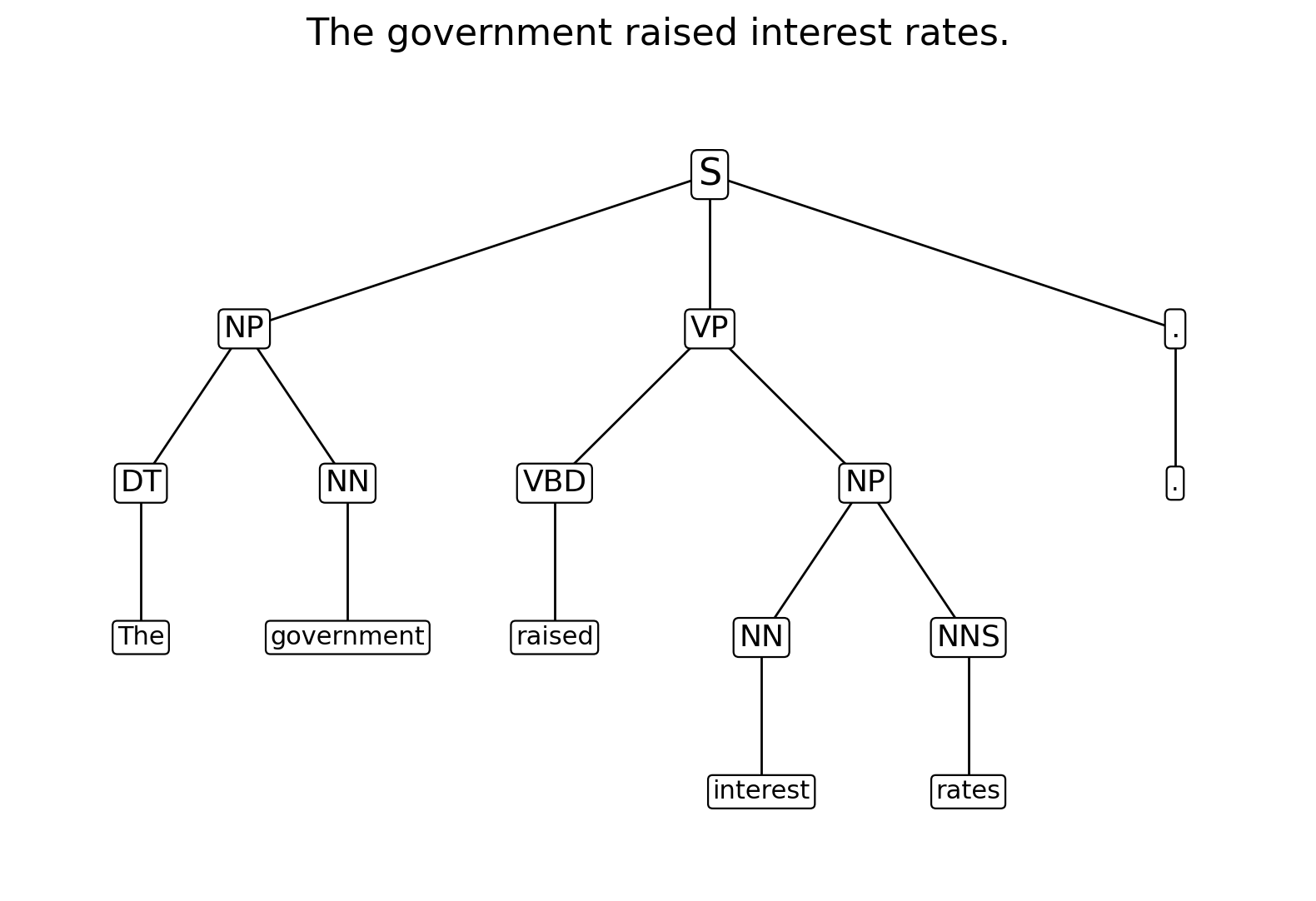
Bracketed parse
(S
  (NP (DT The) (NN government))
  (VP (VBD raised)
      (NP (NN interest) (NNS rates)))
  (. .))
Explanation
This sentence has a straightforward structure:
- The government forms the subject noun phrase (NP).
- raised interest rates forms the verb phrase (VP).
- Inside the VP, raised is the main verb.
- interest rates forms the object noun phrase.
This is a useful introductory example because the sentence is short and the phrase boundaries are quite clear.
Sentence 2: “The internet gives everyone a voice.”
Diagram
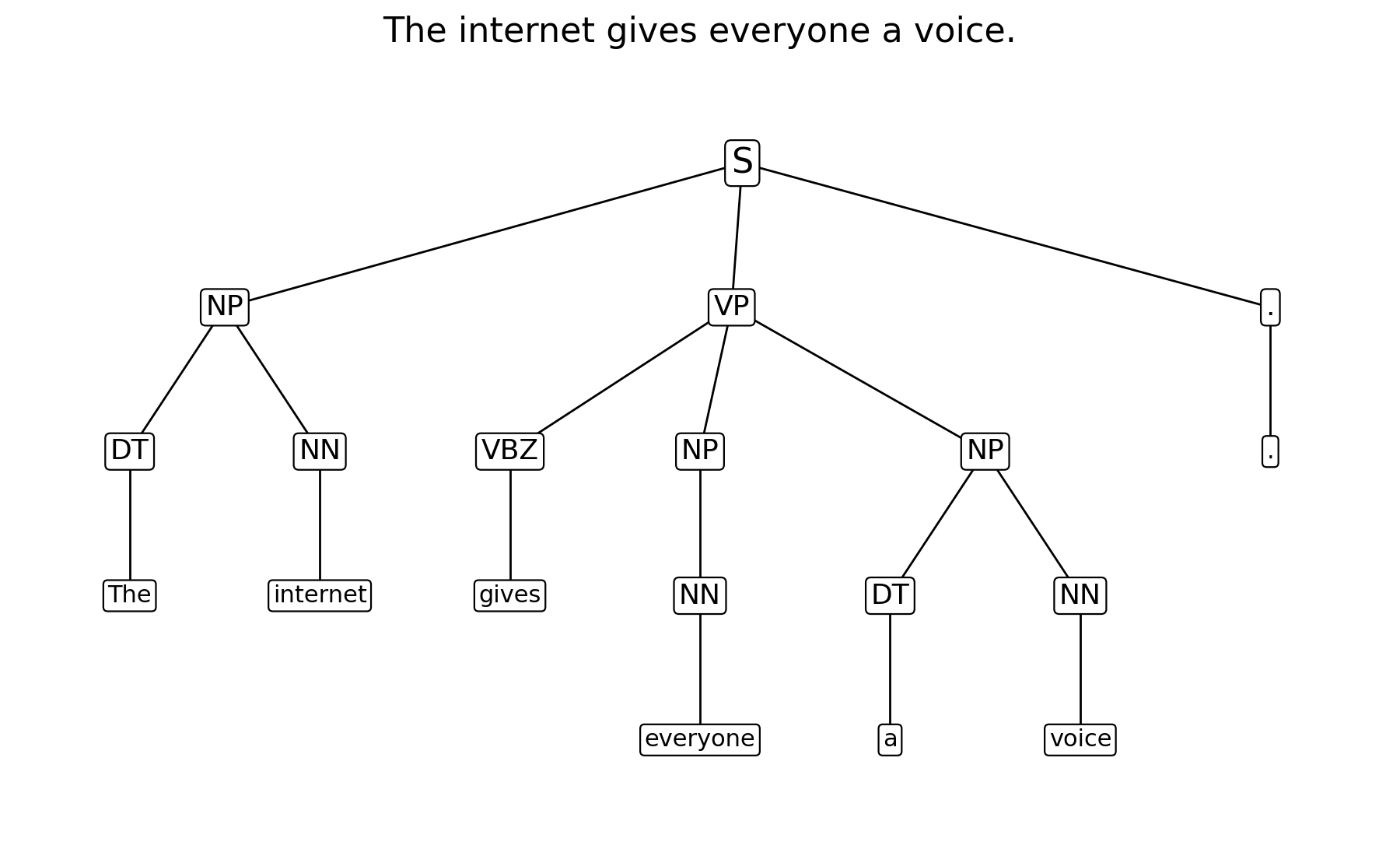
Bracketed parse
(S
  (NP (DT The) (NN internet))
  (VP (VBZ gives)
      (NP (NN everyone))
      (NP (DT a) (NN voice)))
  (. .))
Explanation
This sentence is slightly more interesting because the verb phrase contains two noun phrase complements:
- The internet is the subject NP.
- gives is the head of the VP.
- everyone is the first NP inside the VP.
- a voice is the second NP inside the VP.
This pattern is helpful for understanding how some verbs take more than one complement. It also shows that constituency trees can represent more than just a simple subject-verb-object pattern.
Sentence 3: “The man saw the dog with the telescope.”
Diagram
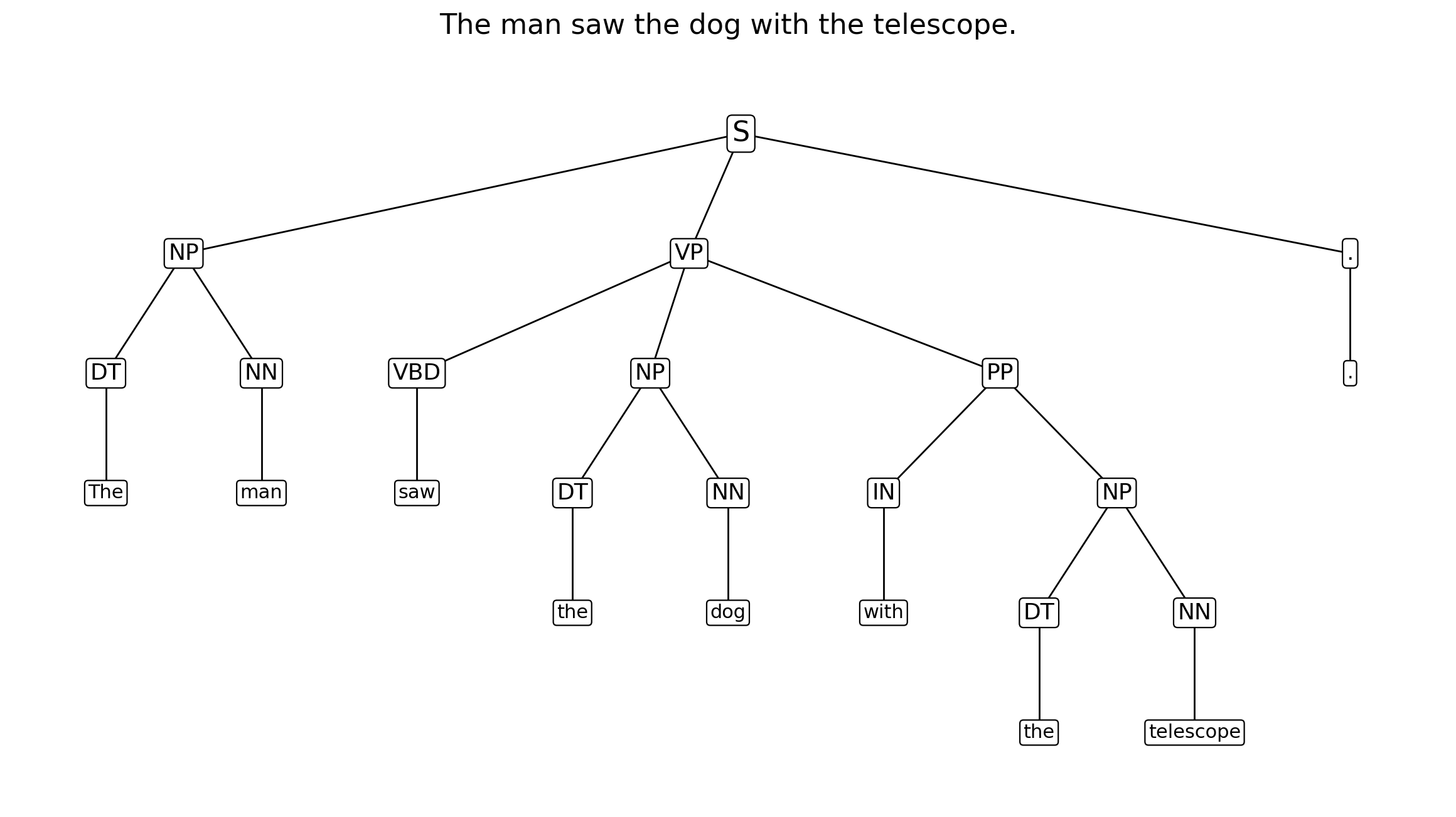
Bracketed parse
(S
  (NP (DT The) (NN man))
  (VP (VBD saw)
      (NP (DT the) (NN dog))
      (PP (IN with)
          (NP (DT the) (NN telescope))))
  (. .))
Explanation
This sentence is the most interesting of the three because it is syntactically ambiguous.
In the tree shown above, the prepositional phrase with the telescope is attached to the VP, which gives the reading:
- the man used the telescope to see the dog
However, there is another valid reading in which the PP attaches to the noun phrase the dog, giving the interpretation:
- the man saw the dog that had the telescope
This is a classic example of structural ambiguity. It shows that two different tree structures can produce two different meanings even though the surface sentence is identical.
What I learned
This activity helped me understand three things more clearly.
1. Constituency trees are hierarchical representations
Before drawing the trees, it is easy to think of a sentence as just a row of words. The parse tree makes it obvious that grammar works in layers. Words group into phrases, and phrases group into larger phrases until a full sentence is formed.
2. Not every sentence has only one possible structure
The sentence about the telescope demonstrates that parsing is not always mechanically obvious. A parser has to decide where an attachment belongs, and that decision affects interpretation.
3. spaCy is practical when combined with the right extension
spaCy on its own is widely used for tokenisation and dependency-oriented analysis, but by integrating benepar it can also support constituency parsing in a clean workflow. That makes it useful both for experimentation and for teaching examples like these.
Conclusion
Overall, this was a useful exercise because it connected a theoretical topic from NLP with a practical Python workflow. I was able to move from plain text, to formal phrase-structure output, to visual diagrams that can be included in an e-Portfolio.
The most valuable part of the task was learning how the structure of a sentence can be represented explicitly. That makes constituency parsing a strong foundation for further work in syntax, ambiguity, and language understanding systems.
Personal reference notes
- Use spaCy + benepar when I want constituency parsing in Python.
- Read the parse from
sent._.parse_string. - Convert the bracketed string into an NLTK
Tree. - Watch for ambiguity in prepositional phrase attachment.
Full Python script
#!/usr/bin/env python3
"""
Generate constituency parse trees for a small set of sentences using spaCy + benepar,
then save the trees as PNG images.

Install first:
    pip install spacy benepar nltk matplotlib
    python -m spacy download en_core_web_sm
    python -c "import benepar; benepar.download('benepar_en3')"

Notes:
- spaCy handles the text pipeline.
- benepar adds constituency parsing to the spaCy pipeline.
- NLTK is used here only to turn the bracketed parse string into a Tree object.
- matplotlib is used to save the tree diagram as a PNG.
"""

from pathlib import Path
import spacy
import benepar
from nltk.tree import Tree
import matplotlib.pyplot as plt


SENTENCES = [
    "The government raised interest rates.",
    "The internet gives everyone a voice.",
    "The man saw the dog with the telescope.",
]

def compute_positions(tree):
    """Assign x/y positions to each node for simple tree drawing."""
    positions = {}
    leaf_counter = [0]
    max_depth = [0]

    def walk(node, depth, path):
        max_depth[0] = max(max_depth[0], depth)

        if isinstance(node, str):
            x = leaf_counter[0]
            leaf_counter[0] += 1
            positions[path] = (x, depth, node, True)
            return x

        child_xs = [walk(child, depth + 1, path + (i,)) for i, child in enumerate(node)]
        x = sum(child_xs) / len(child_xs)
        positions[path] = (x, depth, node.label(), False)
        return x

    walk(tree, 0, ())
    return positions, max_depth[0], leaf_counter[0]


def draw_tree(tree, outpath: Path, title: str):
    """Draw a constituency tree to a PNG file."""
    positions, max_depth, n_leaves = compute_positions(tree)

    fig_w = max(8, n_leaves * 1.3)
    fig_h = max(4.5, (max_depth + 1) * 1.1)

    fig, ax = plt.subplots(figsize=(fig_w, fig_h), facecolor="white")
    ax.set_facecolor("white")
    ax.axis("off")

    for path, (x, depth, label, is_leaf) in positions.items():
        if path == ():
            continue
        parent = path[:-1]
        px, pdepth, _, _ = positions[parent]
        ax.plot([px, x], [max_depth - pdepth, max_depth - depth], color="black", linewidth=1.0, zorder=1)

    for path, (x, depth, label, is_leaf) in positions.items():
        y = max_depth - depth
        bbox = dict(boxstyle="round,pad=0.18", fc="white", ec="black", lw=0.8)
        fs = 16 if depth == 0 else (13 if not is_leaf else 11)
        ax.text(x, y, label, ha="center", va="center", fontsize=fs, bbox=bbox, zorder=2)

    ax.set_title(title, fontsize=16, pad=16)
    ax.set_xlim(-0.6, n_leaves - 0.4)
    ax.set_ylim(-0.6, max_depth + 0.6)

    fig.tight_layout()
    fig.savefig(outpath, dpi=200, bbox_inches="tight", facecolor="white")
    plt.close(fig)


def slugify(text: str) -> str:
    return (
        text.lower()
        .replace(".", "")
        .replace(",", "")
        .replace(" ", "_")
    )


def main():
    try:
        nlp = spacy.load("en_core_web_sm")
    except OSError as exc:
        raise SystemExit(
            "spaCy model 'en_core_web_sm' is not installed.\n"
            "Run: python -m spacy download en_core_web_sm"
        ) from exc

    # Importing benepar registers the "benepar" spaCy factory.
    if "benepar" not in nlp.pipe_names:
        try:
            nlp.add_pipe("benepar", config={"model": "benepar_en3"})
        except AttributeError as exc:
            raise SystemExit(
                "benepar could not initialize due to an incompatible transformers version.\n"
                "Run: python -m pip install 'transformers<5'"
            ) from exc

    output_dir = Path("parse_tree_output")
    output_dir.mkdir(exist_ok=True)

    for sentence in SENTENCES:
        doc = nlp(sentence)
        sent = next(doc.sents)

        parse_string = sent._.parse_string
        print("=" * 80)
        print(sentence)
        print(parse_string)

        tree = Tree.fromstring(parse_string)
        outpath = output_dir / f"{slugify(sentence)}.png"
        draw_tree(tree, outpath, sentence)

    print(f"\nSaved images to: {output_dir.resolve()}")


if __name__ == "__main__":
    main()